Код:

Код AS3:
<mx:ViewStack id="myViewStack" width="100%" bottom="0" top="25">
    <s:NavigatorContent id="search" label="Search" skinClass="TabSkin" visible="false">
        <s:Label text="Search Screen"/>
    </s:NavigatorContent>

    <s:NavigatorContent id="custInfo" label="Customer Info" skinClass="TabSkin">
        <s:Label text="Customer Info"/>
    </s:NavigatorContent>
</mx:ViewStack>
<s:TabBar dataProvider="{myViewStack}" skinClass="skins.TestTabBarSkin" styleName="title-level2" height="24" left="0" />
TabBar:
Код AS3:
<s:Skin ...>
    <!-- host component -->
    ...
    <!-- states -->
    ...
    <s:DataGroup id="dataGroup" width="100%" height="100%">
        <s:layout>
            <s:ButtonBarHorizontalLayout gap="1"/>
        </s:layout>
        <s:itemRenderer>
            <fx:Component>
                <s:ButtonBarButton skinClass="skins.TabBarButtonSkin" />
            </fx:Component>
        </s:itemRenderer>
    </s:DataGroup>
</s:Skin>
TabBarButton:
Код AS3:
<s:SparkSkin ...>
    <!-- host component -->
    ...
    <!-- states -->
    ...
    <!-- up -->
    <s:Rect top="0" left="0" right="0" bottom="0" topLeftRadiusX="6" topRightRadiusX="6" includeIn="up">
        <s:fill>
            <s:LinearGradient rotation="90">
                <s:GradientEntry color="#00abed"/>
                <s:GradientEntry color="#006abc"/>
            </s:LinearGradient>
        </s:fill>
        <s:stroke>
            <s:SolidColorStroke color="#00aef0"/>
        </s:stroke>
    </s:Rect>

    <!-- selected -->
    <s:Rect id="selectedStates" top="0" left="0" right="0" bottom="-2" topLeftRadiusX="6" topRightRadiusX="6" includeIn="selectedStates, overStates">
        <s:fill>
            <s:SolidColor color="#000000" alpha="0.5" />
        </s:fill>
    </s:Rect>

    <s:Label ...>...</s:Label>
</s:SparkSkin>
Tab:
Код AS3:
<s:Skin ...>
    <!-- host component -->
    ...
    <!-- states -->
    ...
    <!-- полупрозрачный tab -->
    <s:Rect left="0" right="0" top="0" bottom="0" radiusX="6" topLeftRadiusX="0">
        <s:fill>
            <s:SolidColor color="#000000" alpha="0.5" />
        </s:fill>
        <s:stroke>
            <s:SolidColorStroke color="#ff0000" alpha="1" />
        </s:stroke>
    </s:Rect>

    <s:Group ...>...</s:Group>

</s:Skin>
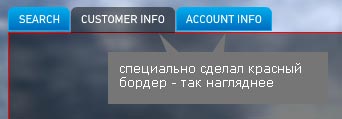
Вся проблема в том что если делать выделенную кнопку полупрозрачной (как это нарисовано на макете) то под этой кнопкой просвечивается бордер самого таба:

 10.09.2010, 01:04



 Древовидный вид